In my last post I wrote about a dbt incremental model that deleted too much: a delete+insert that wiped whole fiscal periods down to a few dozen rows. This time it’s the opposite. In this article I’ll show you how a daily merge kept adding rows that were no longer true, why every dbt run stayed green, how we proved where the problem was, and how we cleaned up 19 months of history without guessing. There’s also a second silent failure hiding inside the first one, which I think is the more useful lesson.
Some background
I’m an analytics engineer at a leading North American housewares company, and we’re moving our SAP reporting onto Snowflake and dbt. One of the models keeps monthly inventory history: for each month, the stock by material, location and batch.
The current month changes every day, so the model rebuilt it every day as an incremental model using merge. Simplified, the config looked like this:
{{
    config(
        materialized='incremental',
        incremental_strategy='merge',
        unique_key='inventory_row_key'
    )
}}
What first caught our attention was that a month’s figure wasn’t changing when we expected it to. Stock had moved, but the history didn’t move with it the way it should have.
When we compared each month in the model against the month-end stock picture, every month from mid-2025 onward was between 35 and 46% too high. One month was missing completely.
The ticket started as a much smaller problem, some duplicated batch rows affecting about 0.24% of the data. I didn’t think that explained what we were seeing, so before fixing anything we measured the whole table against the month-end picture. That’s when it became clear the problem was much bigger.
What merge actually does
Merge looks at each incoming row’s key. If the key already exists in the table, it updates that row. If it doesn’t, it inserts a new one. That’s all. Rows that are in the table but not in today’s batch are left exactly as they are.
For a table where rows only ever change, that’s fine. For a snapshot of “what’s true right now”, it’s a trap, because some rows stop being true.
How the rows piled up
Let’s walk through a simplified version of what happened inside one month.
- Day 3: a material sits at a location with no batch movement yet, so the model writes one row for it without a batch.
- Day 20: the batch has a movement, and from now on the stock shows up as batch-level rows instead. The model writes those.
- Day 30: the batch-level rows are updated with the month-end quantities. The day-3 row has a different key, so merge never touches it again.
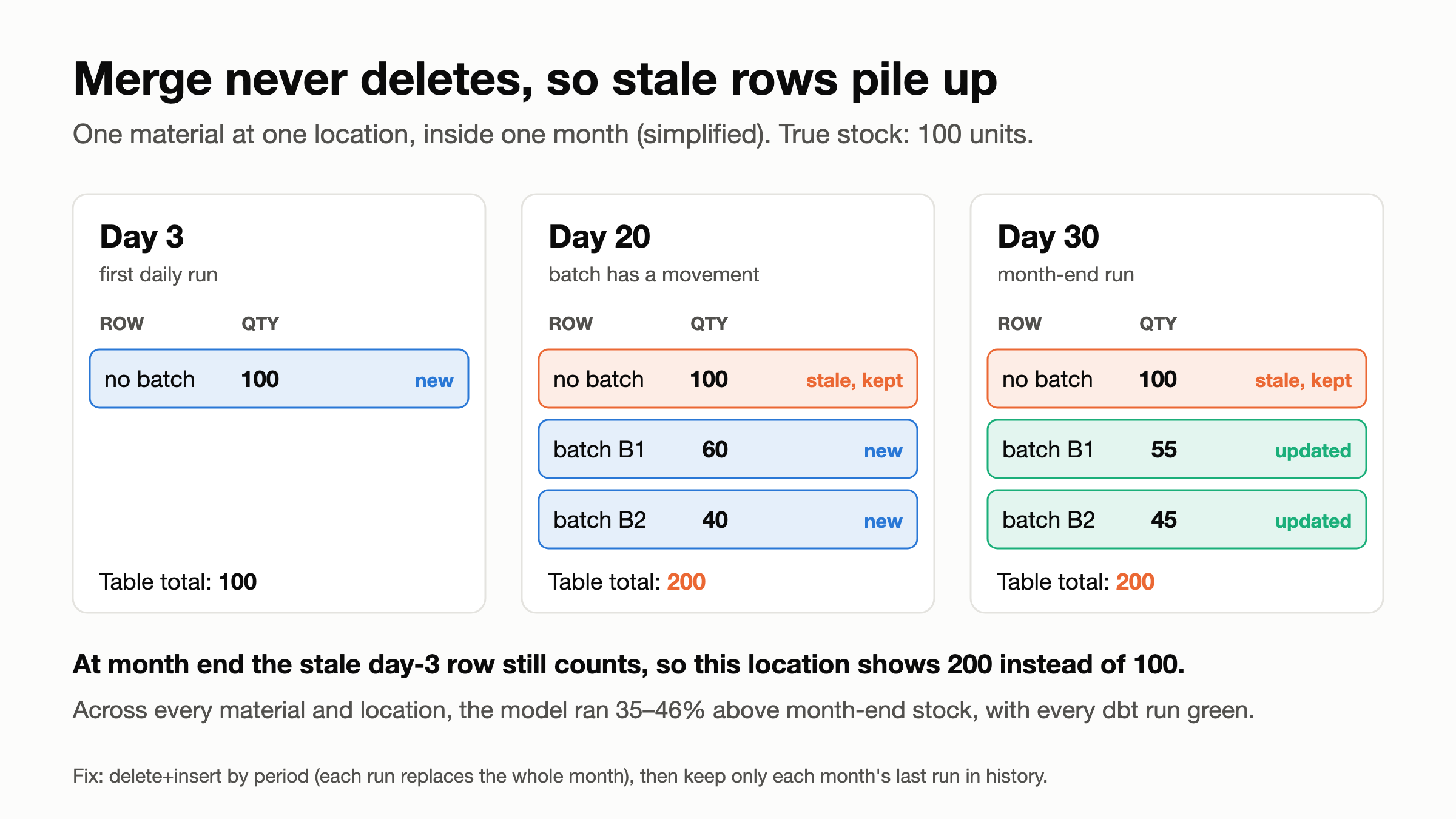
At month end the table holds both: the stale day-3 row and the month-end batch rows, counting the same stock twice. Multiply that by every material, location and day of the month, and you get a history that’s 35 to 46% too high.
Nothing failed. Merge did exactly what it says it does, the table was never empty, and the generic tests (not_null, unique on the key) were all happy, because every row was technically unique.
Proving it was our model and not the source
Before changing anything I wanted to be sure the source data was right. SAP keeps stock at two levels: MARD at storage-location level, and MCHB at batch level. If the source is consistent, the MCHB batches should add up to the MARD figure for each location.
They did, exactly, with a gap of zero. So SAP was consistent, and our model was the thing adding rows.
It also showed a second problem: the model’s batch filter was keeping only about 9.4k of the 22.7k batch rows that actually held stock, so the filter had to change as well.
The fix: replace the whole month
If rows can stop being true, you can’t patch the period. You have to replace it. So the model moved to delete+insert keyed on the period: each run deletes the current month and inserts a fresh, complete copy.
One thing surprised me here. The obvious key is a list of two columns:
unique_key=['calendar_year', 'calendar_period']With that, dbt generated a DELETE ... USING join that hung for more than 11 minutes. Using a single expression as the key made it fast again:
{{
    config(
        materialized='incremental',
        incremental_strategy='delete+insert',
        unique_key='calendar_year * 100 + calendar_period'
    )
}}
Same meaning, one value per period, and a much simpler delete.
Cleaning up history without guessing
The forward fix only protects new months. The 19 months already in the table still held stale rows.
The first idea was a heuristic for which rows looked stale, but that would always be arguable. The better answer was that every daily run stamps its rows with a run date, and the last run of each month is by definition the month-end picture. So the clean-up became exact: keep only the rows from each period’s last run. The idea in SQL:
delete from my_inventory_history h
using (
    select calendar_year, calendar_period, max(target_date) as last_run
    from my_inventory_history
    group by 1, 2
) m
where h.calendar_year = m.calendar_year
  and h.calendar_period = m.calendar_period
  and h.target_date < m.last_run;
We took a backup copy of the table first, deployed the forward fix before the next scheduled run so no run could rebuild the table on the old code, and only then ran the clean-up.
I don’t have write access to production myself, so the clean-up waited until someone who did could run it. That meant the script had to be clear enough for someone else to run step by step, with the expected row count for every month written into it.
The result across 19 months: 836,987 rows became 662,570. Every month matched the expected count exactly, with zero duplicate keys and exactly one run date per month.
The second silent failure
We already had a test for exactly this situation, a singular test that fails when a location has both batch and no-batch rows in the same month. It would have caught the problem the first week.
It never ran. Our CI and scheduled builds exclude singular tests unless they’re tagged, and this one wasn’t. So it sat in the repo looking like protection.
The follow-up tagged it to run nightly against production with an alert, and widened it to cover all of 2025 onward. Then, before trusting it, we ran it against the backup we took before the clean-up. It returned 145,819 failing rows there and zero on the fixed table. Showing a test fail on the broken data before relying on it passing on the good data is a habit worth keeping.
To sum up
Merge is the right tool when rows only change. When rows can stop being true, like a snapshot of current stock, replace the whole period instead. If you use delete+insert with a composite key on Snowflake, try a single expression before a list. Check your history against an independent snapshot or a second source table. And make sure your tests actually run, because a test that never runs is worse than no test: it makes you feel covered.
My own rule now is to use merge only when rows never disappear, and to replace the whole period whenever a row can stop being true.
If you want to check your own project, start with the models that rebuild a current period. On dbt-snowflake, merge is the default strategy whenever you set a unique_key, so a model can be on merge without ever saying so:
grep -rln "unique_key" models/ | xargs grep -L "incremental_strategy"That lists models with a unique key but no explicit strategy, which on Snowflake means merge.
This is the second post in my series about failures in the data stack where everything is green and the numbers are still wrong. Next I’ll write about a dbt default that dropped 18 columns from one of our tables for six weeks without a single warning.
If your team is looking to implement AI solutions, especially on top of data you need to be able to trust, you can book a free 15-minute AI Quick Audit or message me on LinkedIn.
This post first appeared on dev.to.